


Ergonomic Wireless Keyboard with Trackball - Built-In Trackball, Split Layout, 2.4GHz
Skip the mouse entirely. This ergonomic keyboard has a built-in trackball so you can type, scroll, and navigate without ever moving your hands — fewer things on your desk, less strain on your wrists, and one less device to charge.
- Built-in trackball — navigate, scroll, and click without reaching for a mouse
- Ergonomic split layout — natural hand positioning for all-day comfort
- Wireless 2.4GHz — reliable connection with USB nano receiver, no cable clutter


Integrated Trackball
Navigate your screen without ever lifting your hands from the keyboard. The built-in trackball and mouse buttons give you complete cursor control right at your fingertips — perfect for streamlined workflows and saving desk space.

Adjustable Backlighting
Work comfortably in any environment with adjustable LED backlighting. Whether you are in a bright office or a dimly lit room, every key is clearly visible so you can type with confidence.


2000mAh Rechargeable
The large 2000mAh built-in battery provides extended use between charges. Go weeks without plugging in, and when it is time, simply recharge via USB. No disposable batteries needed.
19 Shortcut Keys
Dedicated shortcut keys put common functions at your fingertips. Access media controls, browser functions, and system commands with a single press for a faster, more efficient workflow.
Frequently Asked Questions
-
The trackball sits on the right side, controlled by your thumb. Left-click, right-click, and scroll wheel are built in — you never need to reach for a separate mouse.
-
It provides smooth, responsive tracking for everyday computing. There's a short adjustment period if you're new to trackballs, but most users find it intuitive within days.
-
The 2000mAh battery lasts up to 12 months on a single charge — one of the longest-lasting wireless keyboards available. Charge it and forget about it.
-
Yes, 3 levels of white backlighting you can adjust for any lighting condition, plus 19 dedicated shortcut keys for media and productivity.
podría mejorar? si, definitivamente. pero el teclado esta bien. funcional. no es el mas cómodo pero tampoca esta mal. es aceptable por su precio. y si tiene un trackball si scroll esta super funcional. no es lo que compraría nuevamente debido a que mi trackball ya tiene scroll, pero repito, para alguien que no estaría muy bien. si tuviera la bolita mas grande estaría mejor.


podría mejorar? si, definitivamente. pero el teclado esta bien. funcional. no es el mas cómodo pero tampoca esta mal. es aceptable por su precio. y si tiene un trackball si scroll esta super funcional. no es lo que compraría nuevamente debido a que mi trackball ya tiene scroll, pero repito, para alguien que no estaría muy bien. si tuviera la bolita mas grande estaría mejor.
I got this keyboard to experiment with my workflow. I use the number pad a lot for my job, and I find myself switching back and forth between number pad and mouse with my right hand, while my left hand doesn't have much to do. I'm hoping that this track ball built into this keyboard is a sufficient left-hand mouse option so I can have my right hand focus on the number pad. It will take some getting used to. It is a very quiet keyboard and the keys are responsive and feel alright. The layout is pretty good and I love that it includes shortcut keys, which I have missed since my old MS wired keyboard died. I am inordinately excited about a button to launch calculator. Normally, I don't care about backlighting, but this black keyboard, in a sometimes dark spot, makes it tricky to see the keys sometimes, so I have it on for now. It's awesome that it has a copilot button, too. It can even adjust the brightness of your screen, control your music, adjust volume, etc. Loving it so far!


I got this keyboard to experiment with my workflow. I use the number pad a lot for my job, and I find myself switching back and forth between number pad and mouse with my right hand, while my left hand doesn't have much to do. I'm hoping that this track ball built into this keyboard is a sufficient left-hand mouse option so I can have my right hand focus on the number pad. It will take some getting used to. It is a very quiet keyboard and the keys are responsive and feel alright. The layout is pretty good and I love that it includes shortcut keys, which I have missed since my old MS wired keyboard died. I am inordinately excited about a button to launch calculator. Normally, I don't care about backlighting, but this black keyboard, in a sometimes dark spot, makes it tricky to see the keys sometimes, so I have it on for now. It's awesome that it has a copilot button, too. It can even adjust the brightness of your screen, control your music, adjust volume, etc. Loving it so far!
This has to be one of my favorite keywords to review so far. Included in the box is the keyboard with built-in trackball mouse, usb-a to usb-c charging cable, and well laid out instruction manual. The keyboard itself has responsive and quiet back-lit keys, shortcut and function keys, a scroll wheel, and trackball mouse with left and right click keys. The keyboard charges via a usb-c plug on the top edge, and the usb dongle stores in a hatch underneath, near where the on/off switch is also located. Setup is plug and play under Windows 11, with media and common apps and shortcut keys working great - I really appreciated the dedicated Copilot key as well. The one item I did adjust right away was the trackball/pointer speed, which was faster than I am used to, but this tweak was quick and easy via the default windows mouse settings under the control panel.


This has to be one of my favorite keywords to review so far. Included in the box is the keyboard with built-in trackball mouse, usb-a to usb-c charging cable, and well laid out instruction manual. The keyboard itself has responsive and quiet back-lit keys, shortcut and function keys, a scroll wheel, and trackball mouse with left and right click keys. The keyboard charges via a usb-c plug on the top edge, and the usb dongle stores in a hatch underneath, near where the on/off switch is also located. Setup is plug and play under Windows 11, with media and common apps and shortcut keys working great - I really appreciated the dedicated Copilot key as well. The one item I did adjust right away was the trackball/pointer speed, which was faster than I am used to, but this tweak was quick and easy via the default windows mouse settings under the control panel.
I’ve tried a lot of keyboards, but this one stands out. I love the split design, including the split space bar -- it feels very natural to type with my hands apart and it reduces wrist strain. The trackball is cool but I've never liked rubbing on a keyboard and prefer a good ole fashioned mouse. You can easily disable the trackball if you feel the same.The backlit keys are a nice touch, making late-night typing easier, and the rechargeable battery makes this truly a wireless keyboard. The shortcut keys are a time-saver, and everything just flows smoothly.One thing to note: the little "feet" that you usually use to raise the keyboard a bit are at the bottom, not the top like on other keyboards. I'm sure there's a good reason for that -- it doesn't make the keyboard uncomfortable, I had just never seen that before. Anyway, now that I'm used to it, I love this keyboard and think it is worth the price. Highly recommended!
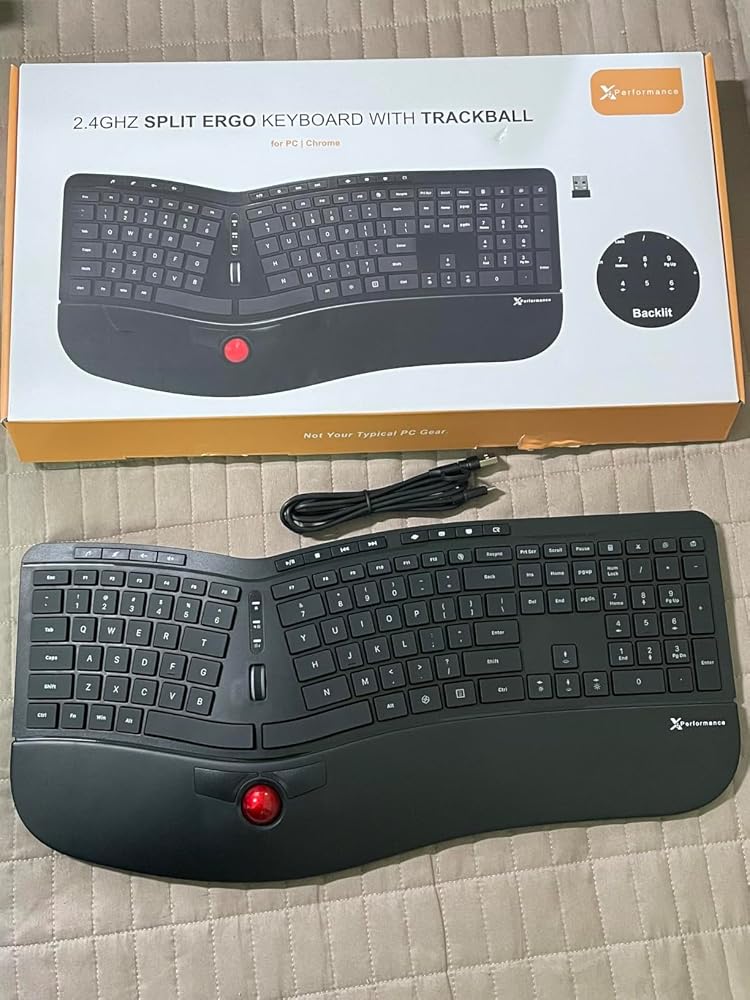
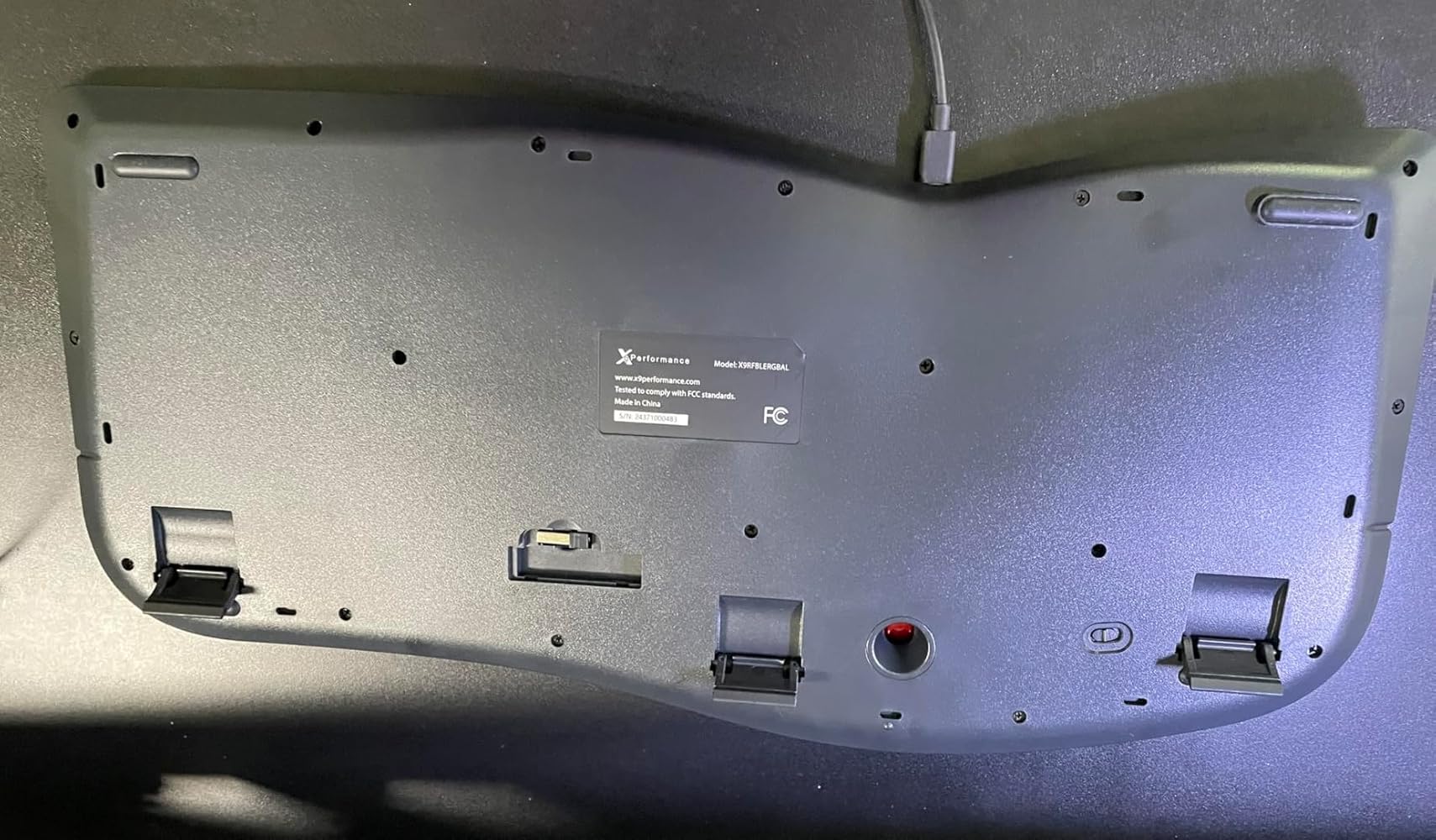
I’ve tried a lot of keyboards, but this one stands out. I love the split design, including the split space bar -- it feels very natural to type with my hands apart and it reduces wrist strain. The trackball is cool but I've never liked rubbing on a keyboard and prefer a good ole fashioned mouse. You can easily disable the trackball if you feel the same.The backlit keys are a nice touch, making late-night typing easier, and the rechargeable battery makes this truly a wireless keyboard. The shortcut keys are a time-saver, and everything just flows smoothly.One thing to note: the little "feet" that you usually use to raise the keyboard a bit are at the bottom, not the top like on other keyboards. I'm sure there's a good reason for that -- it doesn't make the keyboard uncomfortable, I had just never seen that before. Anyway, now that I'm used to it, I love this keyboard and think it is worth the price. Highly recommended!
I am obsessed with keyboards because my job involves a lot of writing, most of it at home. This is my fifth keyboard in my search for the ultimate one. This keyboard is a work of art. It is a full-sized yet fairly thin keyboard that weighs very little. Three features make this keyboard stand out: The trackball, mouse keys and scroll wheel. I have never seen these on any other keyboard. This means that the keyboard can technically be used for all input actions including all mouse functions. I would still obtain an independent mouse, because it is just faster to use. But the fact that this keyboard can carry out all of the functions of a mouse is just incredible. The track ball gleams Porsche-red. It is an eye catcher.The wrist rest is also quite welcome. There is a brand out there which shall remain unnamed that is prolific in making ergonomic - but not necessarily economic - keyboards. This one packs features that would would compete favorably or even excel that other brand. The first time I ever saw an "ergonomic" keyboard, with the keys arranged roughly in an upside down V, then sloping down ever so gradually to the bottom, it was made by that other brand. This keyboard is more than a match for that one. I love that it has a rechargeable battery via USB; this is a requirement for me nowadays. The USB dongle was so cleverly hidden in a recess underneath the device, I did not even notice it. One feature I wish it had was the ability to connect to my laptop via Bluetooth. But this is not even close to a deal-breaker. Another feature I would have liked to see is a leather - rather than rubber (or plastic) wrist rest, as comes standard on some of the ergonomic keyboards I have seen offered by other brands. Saliently, this keyboard offers all of its myriad features at a fairly reasonable price.In operation: Connecting this to my laptop was fairly simple. First, I turned the power button on. The power buttion is located under the keyboard and is easy to miss. Then I pressed the "Resync" button on the keyboard and inserted the dongle. The connection was instant. All of the mouse functions worked. The 19 dedicated shortcut keys for media manipulation (including play, fast-forward, back, etc.) are much appreciated and also are not commonly found on other keyboards. The fact that this keyboard is rated to go 12 months on a single charge is also much appreciated. Of critical importance to me: the keys are backlit. This is a feature missing on some of my other keyboards and is a requirement for me because I often work in dark rooms.I am no longer searching for an ultimate keyboard because this one has all of the features I would ever need. I would highly recommend this product.


I am obsessed with keyboards because my job involves a lot of writing, most of it at home. This is my fifth keyboard in my search for the ultimate one. This keyboard is a work of art. It is a full-sized yet fairly thin keyboard that weighs very little. Three features make this keyboard stand out: The trackball, mouse keys and scroll wheel. I have never seen these on any other keyboard. This means that the keyboard can technically be used for all input actions including all mouse functions. I would still obtain an independent mouse, because it is just faster to use. But the fact that this keyboard can carry out all of the functions of a mouse is just incredible. The track ball gleams Porsche-red. It is an eye catcher.The wrist rest is also quite welcome. There is a brand out there which shall remain unnamed that is prolific in making ergonomic - but not necessarily economic - keyboards. This one packs features that would would compete favorably or even excel that other brand. The first time I ever saw an "ergonomic" keyboard, with the keys arranged roughly in an upside down V, then sloping down ever so gradually to the bottom, it was made by that other brand. This keyboard is more than a match for that one. I love that it has a rechargeable battery via USB; this is a requirement for me nowadays. The USB dongle was so cleverly hidden in a recess underneath the device, I did not even notice it. One feature I wish it had was the ability to connect to my laptop via Bluetooth. But this is not even close to a deal-breaker. Another feature I would have liked to see is a leather - rather than rubber (or plastic) wrist rest, as comes standard on some of the ergonomic keyboards I have seen offered by other brands. Saliently, this keyboard offers all of its myriad features at a fairly reasonable price.In operation: Connecting this to my laptop was fairly simple. First, I turned the power button on. The power buttion is located under the keyboard and is easy to miss. Then I pressed the "Resync" button on the keyboard and inserted the dongle. The connection was instant. All of the mouse functions worked. The 19 dedicated shortcut keys for media manipulation (including play, fast-forward, back, etc.) are much appreciated and also are not commonly found on other keyboards. The fact that this keyboard is rated to go 12 months on a single charge is also much appreciated. Of critical importance to me: the keys are backlit. This is a feature missing on some of my other keyboards and is a requirement for me because I often work in dark rooms.I am no longer searching for an ultimate keyboard because this one has all of the features I would ever need. I would highly recommend this product.
Un teclado para computadora de muy buena calidad y muy como de usar durante varías horas. Muy recomendable para la oficina o la escuela!!

Un teclado para computadora de muy buena calidad y muy como de usar durante varías horas. Muy recomendable para la oficina o la escuela!!
The keyboard arrived promptly. It is quieter than my old keyboard. I like the ability to charge by USB rather than using batteries.
I had high hopes of using this to save space on my desk, but honestly the trackball is so small that balancing tracking speed with accuracy across dual monitors is nearly impossible. Mostly it's an ok backup mouse when my old Kensington disconnects unexpectedly.
The keyboard is decent, good for working. On par with the Microsoft ergonomic one which is my third favorite keyboard.